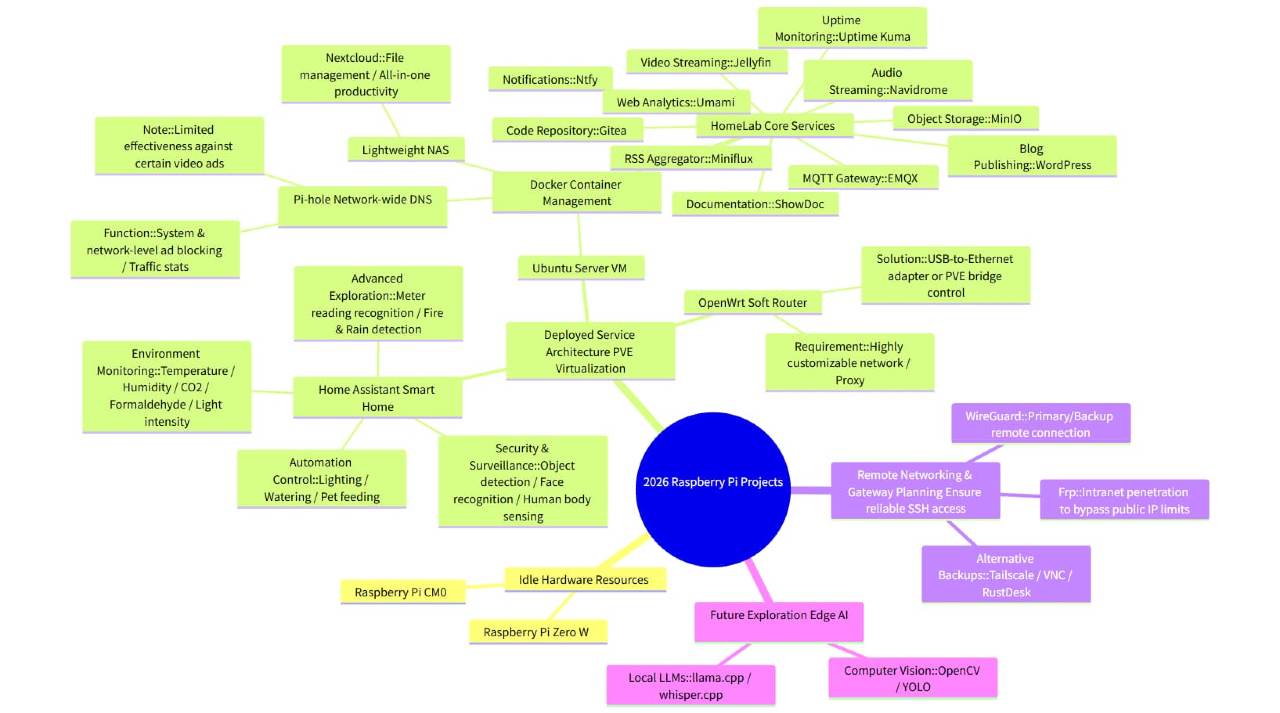
Raspberry Pi
I have a few idle Raspberry Pis gathering dust at home, so I’ve compiled some Raspberry Pi projects.
Home Assistant
Let’s start with software.
First up is Home Assistant, for smart home automation.
It can detect room temperature and humidity, CO2 and formaldehyde levels, light intensity (or outdoor sunrise/sunset), and control lights.
If you grow plants or keep fish, it can also automate watering, feeding, etc.
For security, it offers person detection, facial recognition, human body sensing, and more.
It can be integrated with scenarios, such as automatically turning off lights when leaving, turning on lights when entering, or automatic sensing and switching for night lights.
More specific uses require self-exploration, such as timed camera snapshots and detection of water, electricity, and gas meters, automatically recognizing numbers and setting threshold alerts, fire detection, rain detection, natural gas detection, etc.
Pi-hole
Removes ads at the system and network layers.
This means it’s not just about installing browser plugins; once Pi-hole is deployed, any internet-connected device in your home—phones, computers, TVs, tablets, etc.—will have ads filtered.
It’s a DNS server running on your local network that can log your domain visits, automatically filter, cache, and load requests. Not only will you see fewer ads, but pages will also load faster and cleaner.
However, it’s important to note that this doesn’t mean ads on platforms like YouTube will be blocked. It can only block most ad types, not all.
It can visualize traffic statistics and provide data-driven insights into your network usage.
OpenWrt
Also a network application, suitable for scenarios requiring highly customized networks or proxy needs.
Raspberry Pi typically has only one network interface, which means it’s not ideal for OpenWrt. However, if we have a network requirement for OpenWrt, we can use a USB-to-Ethernet adapter to set it up.
Personally, I recommend installing Proxmox VE (PVE) first, and then OpenWrt. This offers more network control and allows for easy switching.
By the way, Raspberry Pi OS is based on Debian. While Debian x86 can install PVE, the ARM version doesn’t have official PVE support. However, there are community scripts for installing PVE on Raspberry Pi, which I have successfully used.
I have installed both Home Assistant and OpenWrt within the PVE system on my Raspberry Pi, and the results are quite good so far. As for Pi-hole, I installed Ubuntu Server on PVE and then installed it via Docker, which is practically no different from flashing the entire system onto the Raspberry Pi.
However, I installed Pi-hole to block ads on my TV, but it ultimately failed to intercept them.
Gateway
When I’m away from home, I particularly need a stable way to connect to my home network at any time.
Just yesterday, the WireGuard deployed at home failed for unknown reasons. I restarted the cloud-based WireGuard and found the issue was with the local WireGuard on my home computer. However, because of the home WireGuard issue, I couldn’t SSH into my home Linux machine (I don’t have remote desktop at home).
Ultimately, I had to use another method, like FRP, to connect to my home server and restart WireGuard, which brought some related services back online.
Therefore, for devices like Raspberry Pi, acting as a gateway is most suitable, using tools like WireGuard, FRP, VNC, RustDesk, Nginx, P2P Tailscale, etc.
I have idle Raspberry Pi Zero W and Raspberry Pi CM0 units at home. When I have time, I plan to set up WireGuard and FRP to ensure I can always SSH into my home server devices when I’m away.
Lightweight NAS
NAS (Network Attached Storage) is gaining popularity, with many brands releasing their own solutions.
The sensitivity of video editing and personal data has led to an increasing number of NAS users.
Raspberry Pi can serve as a lightweight NAS, for example, using Nextcloud for integrated file management and office tasks. While not as professional as solutions from brands like Synology or QNAP, it’s sufficient for general use.
Nextcloud can be flashed as an entire system onto a Raspberry Pi TF card, but I still recommend installing it in Docker for easier management and data migration (especially when data grows and exceeds the TF card’s capacity).
Homelab
All the systems mentioned above can be considered part of a homelab. Here, “homelab” refers more specifically to Docker-related services.
For example, EMQX MQTT (can be integrated with Home Assistant), WordPress (can be combined with a gateway to publish blogs for public access), ntfy (notification service), Umami (website analytics), Gitea (code repository), MinIO (file storage), Uptime Kuma (website monitoring), ShowDoc (Markdown documentation).
Also, music libraries (Navidrome), video libraries (Jellyfin), Miniflux (RSS feed reader), Calibre-Web (e-book library).
And password management, PDF receipt/document management, scheduled tasks, calendar dashboards, etc. I won’t list them all, as new Docker applications are released daily, open-source and free.
Edge AI
AI capabilities should be highlighted separately, such as machine vision with OpenCV, YOLO, etc.
For example, llama.cpp, whisper.cpp, etc.
I haven’t experimented much with these yet, but I’ll organize them one by one later.