Mind Map
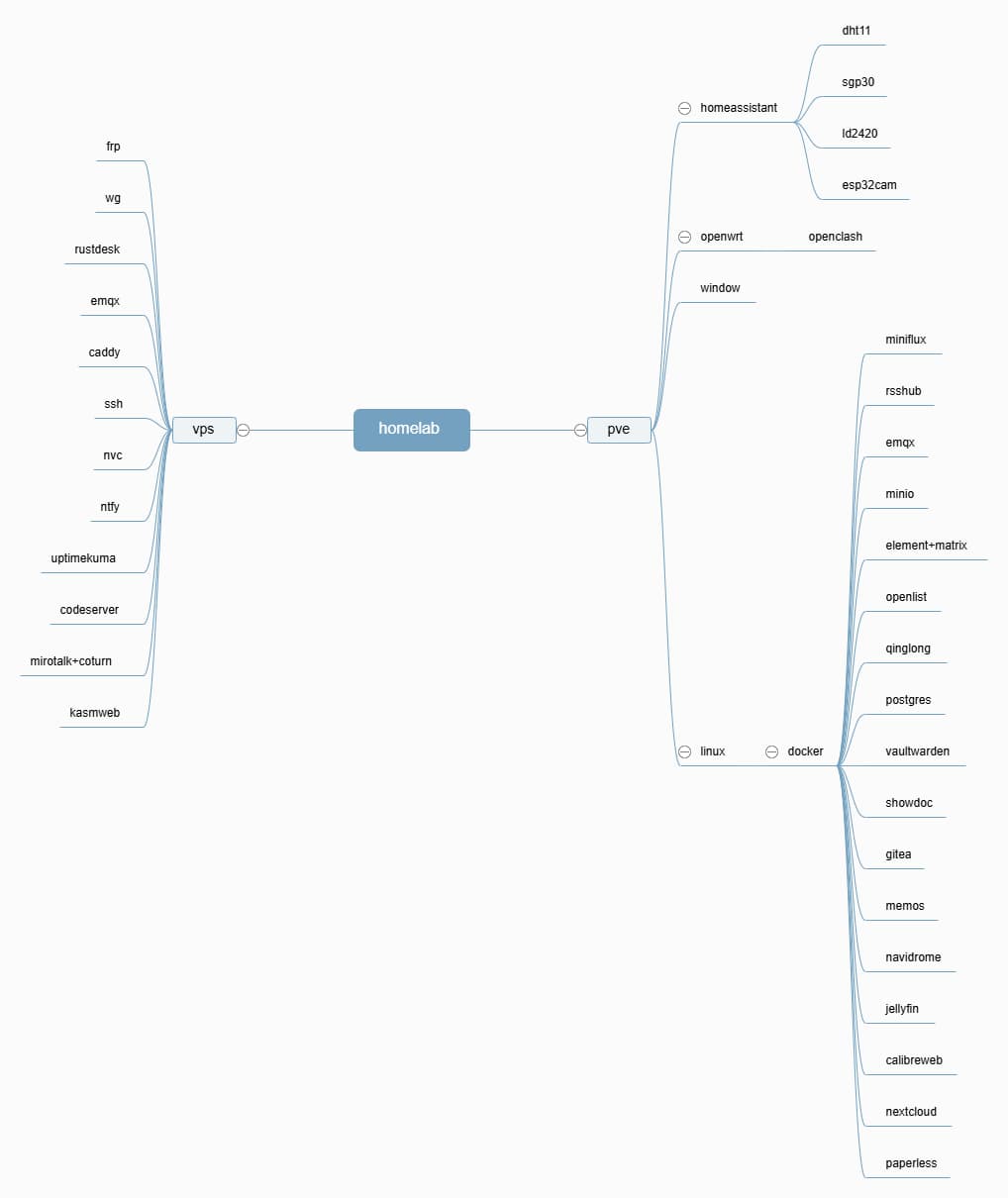
Using images to organize some daily nodes, such as VPS cloud servers and local PVE hosts.
The core includes Docker, Home Assistant, OpenWrt, Windows, etc.
Cloud servers are mainly for communication protocols and notification messages. One is to allow local services to be accessible on the public network, another is to ensure important events have message notifications, and there’s also smart home communication like EMQX and website monitoring. All of these require public network traffic and 24/7 online availability.
Local Docker is relatively more geared towards entertainment and light office work, such as passwords, documents, listening to music, watching movies, data, storage, etc.
Monetization Methods
Among these, Home Assistant doesn’t make money, and listening to music or watching TV locally doesn’t make money.
VPS cloud service notifications and traffic also don’t make money. There are only 2 ways to make money:
- One is websites like WordPress, blogs, etc., by adding commissions, Google Ads, selling your own paid e-books, and donations.
- The other is automation, such as n8n, Qinglong Panel, etc. For example, automatically posting to Twitter, automatically publishing YouTube shorts, automatically generating blog posts, automatic check-ins, unmanned live streaming. Choose a platform, then automate AIGC, and then get revenue from the platform.
Many people buy cloud servers either for building websites or for using public network traffic. Other businesses are not discussed in this article.
Independent Studio
The concept of a one-person company is very popular.
Twitter is full of so-called founders, which is very overly inspirational and boring.
A homelab can be for personal entertainment, such as setting up games like Minecraft or Palworld, or it can be a home theater and music system, or even your own workstation, fully running your own business.
This way, you can make money at home, and even when you’re out, you’ll have access to your data and automated business operations.
You can try some new AI technologies and interesting open-source applications, then form your own business workflow.
The mind map above is roughly organized into 4 modules, along with some common open-source services. Any missing ones will be added later.
I recommend mini PCs and development boards like Raspberry Pi. I will also add services like cloud phones later.
If you’re on a tight budget, you can start with an old laptop like I did, running a blog and some other services.
Tips
I primarily recommend deploying WordPress, whether it’s for an independent e-commerce site, a course website, an official website display, or a personal blog.
WordPress has corresponding plugins for all of these. The earlier you establish it, the better it will be indexed by search engines. You can tinker with and optimize your own website freely, without restrictions, and continuously add content and monetization methods.
You can appropriately combine AI tools like Codex and Cursor to help improve efficiency.
For everything else, follow your own hobbies and business needs.