The Cause
My Orange Pi 3B (8GB, running Linux) rebooted suddenly after a power outage.
After rebooting, I discovered network errors: I couldn’t SSH into the device via the local network, and local services that were previously proxied for public access were no longer accessible.
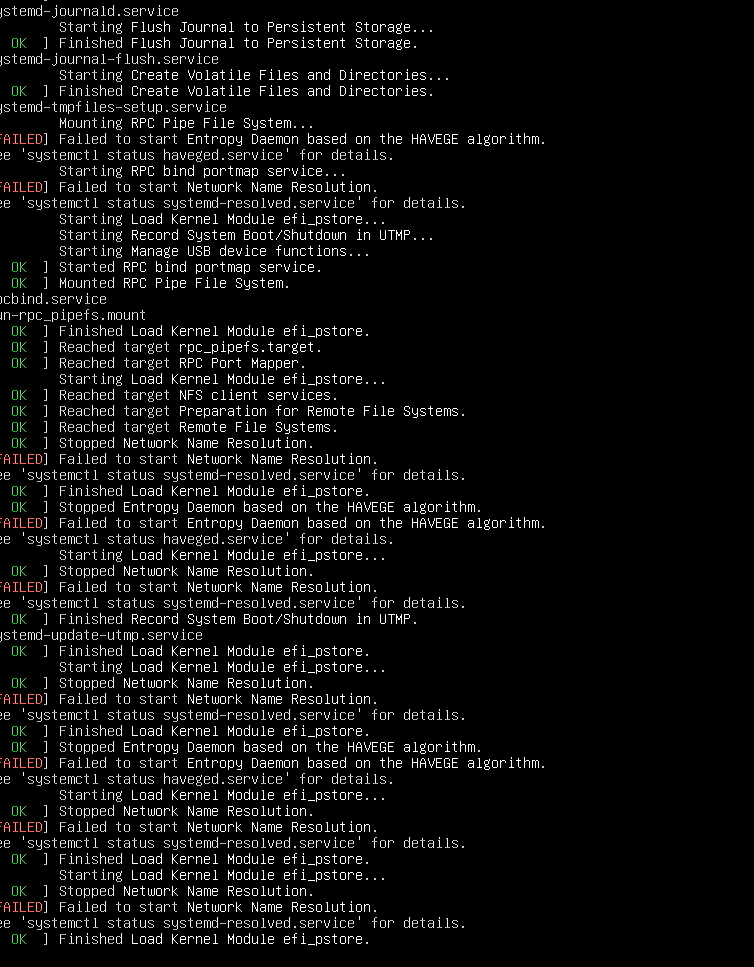
I checked the startup logs using OBS screen capture.
The logs indicated a general issue with the network service startup.
The Fix
I couldn’t modify system-level errors because the SSD contained important, unbacked-up data.
For instance, my ShowDoc drafts and Gitea code repositories were stored on this Orange Pi 3B.
Ultimately, I resolved the issue by stopping and restarting the WireGuard (wg) service on my cloud server to refresh the cache (a solution found through repeated troubleshooting and debugging with the free version of ChatGPT).
As long as the local proxy services are accessible from the public internet, I’m content to let the other errors persist.
Local AI Model Analysis
Analysis using Qwen3.6 35B-a3b:
Error logs:
systemd-journald.service
Starting Flush Journal to Persistent Storage...
[ OK ] Finished Flush Journal to Persistent Storage.
systemd-tmpfiles-setup.service
Starting Create Volatile Files and Directories...
[ OK ] Finished Create Volatile Files and Directories.
systemd-tmpfiles-setup.service
Mounting RPC Pipe File System...
[FAILED] Failed to start Entropy Daemon based on the HAVEGE algorithm.
See 'systemctl status haveged.service' for details.
Starting RPC bind portmap service...
[FAILED] Failed to start Network Name Resolution.
See 'systemctl status systemd-resolved.service' for details.
Starting Load Kernel Module efi_pstore...
Starting Record System Boot/Shutdown in UTMP...
Manage USB device functions...
[ OK ] Started RPC bind portmap service.
[ OK ] Mounted RPC Pipe File System.
rpcbind.service
m-rpc_pipefs.mount
[ OK ] Finished Load Kernel Module efi_pstore.
[ OK ] Reached target rpc_pipefs.target.
[ OK ] Reached target RPC Port Mapper.
Starting Load Kernel Module efi_pstore...
[ OK ] Reached target NFS client services.
[ OK ] Reached target Preparation for Remote File Systems.
[ OK ] Reached target Remote File Systems.
[ OK ] Stopped Network Name Resolution.
[FAILED] Failed to start Network Name Resolution.
See 'systemctl status systemd-resolved.service' for details.
[ OK ] Finished Load Kernel Module efi_pstore.
[ OK ] Stopped Entropy Daemon based on the HAVEGE algorithm.
[FAILED] Failed to start Entropy Daemon based on the HAVEGE algorithm.
See 'systemctl status haveged.service' for details.
Starting Load Kernel Module efi_pstore...
[ OK ] Stopped Network Name Resolution.
[FAILED] Failed to start Network Name Resolution.
See 'systemctl status systemd-resolved.service' for details.
[ OK ] Finished Record System Boot/Shutdown in UTMP.
systemd-update-utmp.service
[ OK ] Finished Load Kernel Module efi_pstore.
Starting Load Kernel Module efi_pstore...
[ OK ] Stopped Network Name Resolution.
[FAILED] Failed to start Network Name Resolution.
See 'systemctl status systemd-resolved.service' for details.
[ OK ] Finished Load Kernel Module efi_pstore.
[ OK ] Stopped Entropy Daemon based on the HAVEGE algorithm.
[FAILED] Failed to start Entropy Daemon based on the HAVEGE algorithm.
See 'systemctl status haveged.service' for details.
Starting Load Kernel Module efi_pstore...
[ OK ] Stopped Network Name Resolution.
[FAILED] Failed to start Network Name Resolution.
See 'systemctl status systemd-resolved.service' for details.
[ OK ] Finished Load Kernel Module efi_pstore.
Starting Load Kernel Module efi_pstore...
[ OK ] Stopped Network Name Resolution.
[FAILED] Failed to start Network Name Resolution.
See 'systemctl status systemd-resolved.service' for details.
[ OK ] Finished Load Kernel Module efi_pstore.
Other Observations
-
Repeated occurrences of “Stopped Network Name Resolution” and “Failed to start…”: This indicates that the system repeatedly attempted to restore the network name resolution service during startup but failed every time. This may be due to other services that depend on it (such as NFS or RPC) continuously retrying or triggering re-initialization.
-
“Reached target Remote File Systems” (Success): Even though DNS resolution failed, NFS mounting might still succeed if IP addresses are used (i.e., if
/etc/fstabspecifies an IP rather than a hostname), though this is not considered best practice.
Overall Recommendation
Prioritize resolving the failure of systemd-resolved.service, as it is a fundamental network service with a wide-ranging impact.
Summary
This is a typical service initialization log from the Linux system startup phase, showing that two key services (haveged and systemd-resolved) failed to start. While some functions (such as NFS and RPC) may still operate, the failures will compromise system stability and network availability in the long run. It is recommended to immediately investigate and fix the causes of these service failures to ensure the system operates correctly and fully.
Tips
I rebooted my local Orange Pi 3B over a dozen times, yet the error persisted.
The root cause was a communication failure between the local WireGuard (wg) instance and the cloud-based WireGuard instance, triggered by cached data resulting from the power outage. Although the keys appeared to match, the cloud-based WireGuard instance was actually refusing to send data to the local Orange Pi 3B.
Since cloud services are rarely rebooted, the issue went undetected.
Therefore, if rebooting the local server fails to resolve the problem, consider restarting the corresponding service on the cloud server to ensure that cached data or similar issues do not interfere with operations.