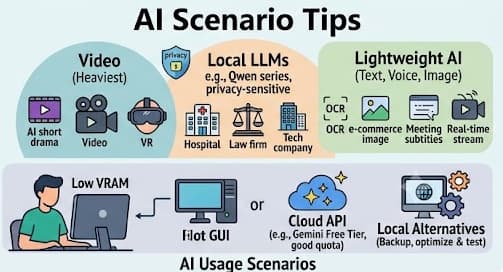
AI CPU
For speech-to-text, whisper.cpp is recommended, followed by Sherpa-ONNX.
For voice assistants with real-time text streaming, sherpa-onnx (new) is recommended over Vosk (old).
For local large language models, llama.cpp is the top choice, followed by Ollama, and then llama-cpp-python.
For TTS (text-to-speech), Piper TTS is recommended.
For OCR, PaddleOCR is recommended.
Other general recommendations include OpenCV, YOLO, and FFmpeg.
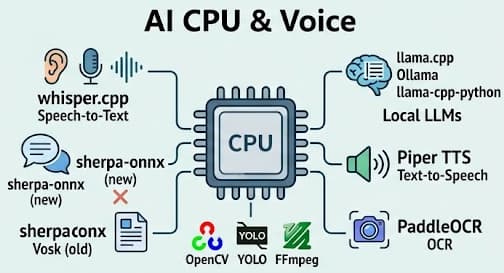
AI Ecosystem
Among development boards, Raspberry Pi has relatively high visibility. This is not because it is cheap, but because it has an excellent ecosystem; new projects are usually compatible with Raspberry Pi first, or exclusively.
The first project I learned about was openclaw, which was quite popular a while ago, but it was quickly replaced by newer products and is not very hot right now. It wasn’t long-lasting or unique enough.
Currently, I work a lot with images, text, audio, and video. I prefer GUI methods and tend to dislike node-based workflows like ComfyUI—it’s neither a complete GUI nor a pure API. However, eight or nine out of ten projects I encounter use the ComfyUI format. This proves its ecosystem is incredibly powerful—powerful enough that people create dedicated courses and sell services around it.
Next, for local productivity and LLMs, I learned about Ollama. It is CPU-friendly, offers a wide variety of models, and supports APIs, making it the underlying foundation for other software. Although I use LM Studio, it is merely an easy-to-use GUI tool; the real ecosystem relies on Ollama, which allows you to customize many functions to fulfill specific, unique needs.
Others like n8n for automation have a decent ecosystem but are relatively niche and not where my current interests lie, so I will just log it here for now.
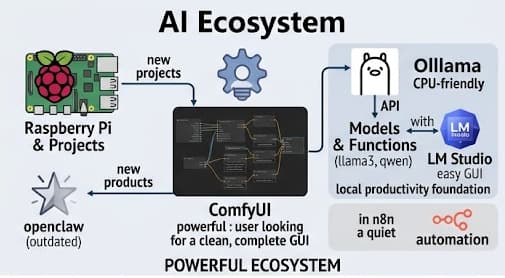
AI Starter Kit
I currently create starter kits in three different forms:
-
Windows Portable Python Environment: Third-party libraries and corresponding models are pre-downloaded. Users only need to click the
startfile to launch it, making it completely offline and usable. This is split into CPU and GPU versions; the GPU version currently only adapts to the RTX 3060, with support for other graphics cards to be determined. -
ComfyUI Workflows: Ready-made JSON node workflows that I can simply reference and reuse. Most of the time, I take workflows optimized by others and resolve plugin and compatibility issues.
-
Docker Containers: Built as a last resort when the top two methods fail to meet requirements. Docker offers the best compatibility; on Windows, its backend is WSL2 (which is Linux). Many AI features are exclusively supported on Linux.
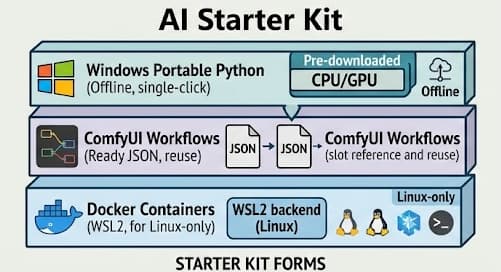
Tips
In the current AI landscape, Video is the heaviest and most widely used scenario, such as AI short dramas, AI short videos, and virtual digital humans.
Next are Local LLMs, such as the Qwen series, which are mainly used in privacy-sensitive organizations like hospitals, law firms, and certain tech companies.
Lightweight AI focuses on text, voice, and images, such as OCR, e-commerce product photos, subtitles, and real-time meeting text streams.
Currently, my hardware configuration has lower VRAM. My primary demand scenario is generating illustrations for blog posts. However, since Gemini’s free tier quota and generation results are quite good, I will prioritize using cloud-based free APIs, while gradually optimizing and testing local alternatives to keep as a backup just in case.